Hvac Heat Pump Balance Point Calculator
Use the Hvac Heat Pump Balance Point Calculator to estimate the outdoor temperature where heat pump capacity meets building heat loss using your design data.
Please complete this field to continue.
Please complete this field to continue.
Please complete this field to continue.
Please complete this field to continue.
Please complete this field to continue.
Please complete this field to continue.
Please complete this field to continue.
Please complete this field to continue.
Results
Hvac Heat Pump Balance Point Calculator
TL;DR Summary
The Hvac Heat Pump Balance Point Calculator estimates the outdoor temperature where a heat pump's heating capacity matches a building's estimated heat loss. It is a planning and sizing aid based on the values you enter and should not be treated as a substitute for a complete HVAC design or professional engineering review. The tool's specific data-handling and storage behavior is not established by the supplied tool information, so avoid entering sensitive information.
About This Tool
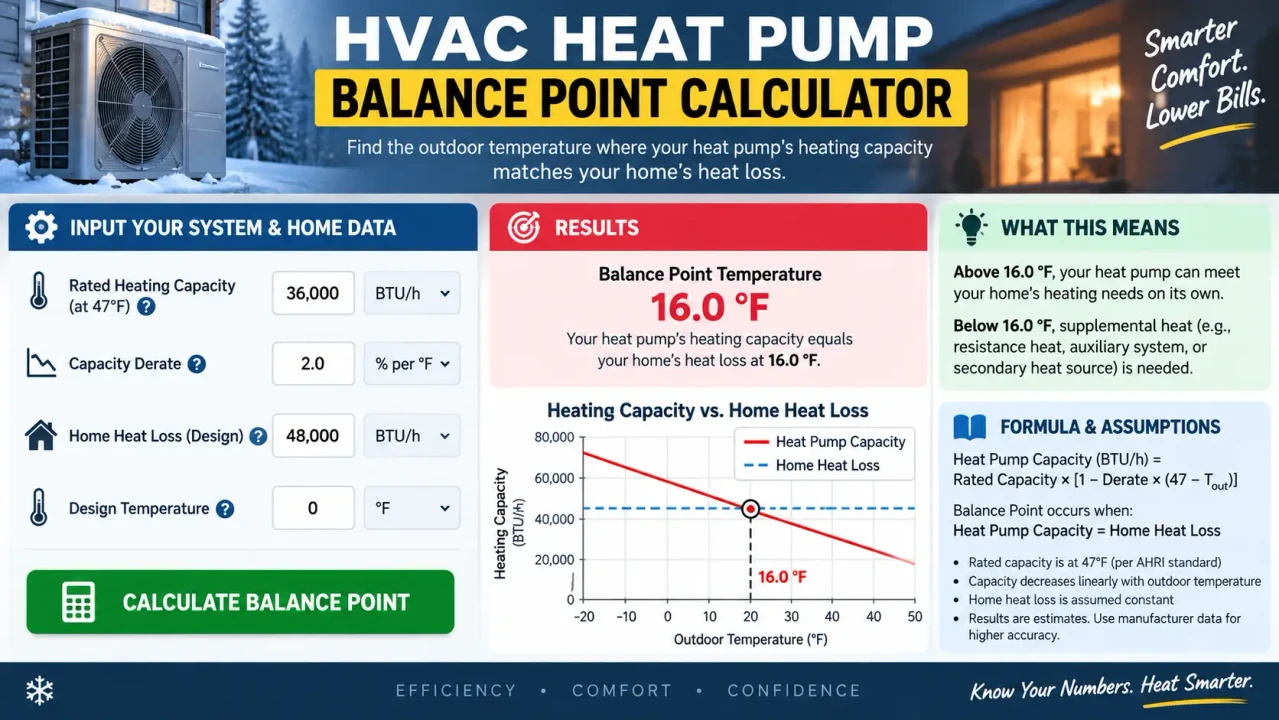
The Hvac Heat Pump Balance Point Calculator helps you estimate the thermal balance point of a heat pump system. The thermal balance point is the outdoor temperature at which the heat pump can provide about the same amount of heating capacity as the building needs at that temperature.
This is useful because a building's heating demand generally increases as outdoor temperature falls, while an air-source heat pump's available heating capacity can also change with outdoor temperature. When the outdoor temperature is above the thermal balance point, the selected heat pump may have enough capacity to meet the modeled heating load. Below the balance point, the heat pump may need supplemental heat to cover the difference. The U.S. Department of Energy describes the thermal balance point as the intersection of the heating-load line and the heat-pump capacity curve. :contentReference[oaicite:3]{index=3}
This calculator is intended for homeowners, HVAC professionals, contractors, energy-efficiency planners, building owners, and anyone comparing heat-pump capacity with a known heating load. It is especially useful when you already have a design heating load and manufacturer heating-capacity data for a specific heat pump.
The calculator uses eight required values. You enter the building's design heating load in BTU/hr, the indoor design temperature in °F, and the outdoor design temperature in °F. You then provide two heat-pump heating-capacity points: a warm-temperature capacity and temperature, plus a cold-temperature capacity and temperature. Finally, you provide the outdoor temperature used as the building's zero-load reference. The default zero-load reference is 65°F, consistent with the balance-point construction described in U.S. Department of Energy HVAC sizing guidance. :contentReference[oaicite:4]{index=4}
The main result is the estimated thermal balance point in °F. The calculator also reports the modeled building heat loss and heat-pump capacity at that balance point. These two values should be approximately equal when the entered data produces a valid intersection.
How to Use
- Step 1: Enter the building's design heating load in BTU/hr. Use a calculated heating-load value for the area served by the heat pump rather than the equipment's nominal tonnage.
- Step 2: Enter the indoor design temperature and outdoor design temperature used for the heating-load calculation.
- Step 3: Enter a warm-temperature heat-pump heating capacity and the outdoor temperature at which that capacity applies.
- Step 4: Enter a cold-temperature heat-pump heating capacity and its corresponding outdoor temperature.
- Step 5: Review the zero-load outdoor temperature. The calculator starts with 65°F, but you can change it when a different building assumption is appropriate.
- Step 6: Run the calculation and review the thermal balance point, modeled building heat loss, and heat-pump capacity at that temperature.
- Step 7: Compare the result with the heat pump's operating strategy and backup-heat plan. If the result falls outside the temperature range covered by your capacity data, use manufacturer data that covers the expected balance-point range.
Technical Explanation and Formula
The calculator models the building heat-loss line as a straight line between the design heating condition and the zero-load outdoor temperature. The standard form used here is:
Building Heat Loss(T) = Qdesign × (Tindoor − T) / (Tindoor − Tdesign)
Where:
- Qdesign = building design heating load in BTU/hr.
- Tindoor = indoor design temperature in °F.
- T = outdoor temperature being evaluated in °F.
- Tdesign = outdoor design temperature in °F.
The heat-pump capacity is modeled as a straight-line interpolation between the two capacity points supplied by the user:
HP Capacity(T) = Qcold + (Qwarm − Qcold) × (T − Tcold) / (Twarm − Tcold)
Where the two capacity values are in BTU/hr and the two corresponding outdoor temperatures are in °F. The calculator then solves for the temperature where:
Building Heat Loss(T) = HP Capacity(T)
That intersection is the estimated thermal balance point.
This is a standard calculation model based on the stated purpose of the tool, rather than a claim about a hidden manufacturer-specific implementation. Actual heat-pump capacity can vary with model, airflow, indoor conditions, defrost operation, controls, and other operating conditions. Manufacturer performance data should therefore be used for the exact equipment being evaluated. DOE guidance likewise points to manufacturer capacity information when creating a balance-point diagram. :contentReference[oaicite:5]{index=5}
Preset Examples / Quick Reference
| Input | Example Value | Unit |
|---|---|---|
| Design heating load | 40,000 | BTU/hr |
| Indoor design temperature | 70 | °F |
| Outdoor design temperature | 17 | °F |
| Warm-point capacity | 36,000 | BTU/hr |
| Warm-point temperature | 47 | °F |
| Cold-point capacity | 24,000 | BTU/hr |
| Cold-point temperature | 17 | °F |
| Zero-load temperature | 65 | °F |
For this example, the building heat-loss line and the interpolated heat-pump capacity line intersect at approximately 25.0°F. The exact result depends on the entered values and should be recalculated for the actual building and equipment.
What the Balance Point Means
The balance point is a thermal capacity comparison, not automatically an economic switchover temperature. A thermal balance point asks when heat-pump capacity meets building heating demand. An economic balance point is a different calculation that compares operating costs between heating sources. Do not treat the thermal result as a fuel-cost recommendation.
At temperatures above the thermal balance point, the modeled heat pump has sufficient capacity to meet the modeled building load. At temperatures below it, the modeled heat-pump capacity is lower than the modeled building load, creating a heating deficit that may need to be supplied by auxiliary or backup heat. DOE guidance identifies this relationship as important for backup-heat planning and heat-pump system design. :contentReference[oaicite:6]{index=6}
Why Use This Hvac Heat Pump Balance Point Calculator & How Our Calculator Beats the Competition
| Method | Ease of Use | Calculation Process | Best For | Limitations |
|---|---|---|---|---|
| Toolhox Calculator | Enter the required values in one form | Uses the entered load and two capacity points to find an intersection | Quick thermal balance-point estimates | Depends on the quality and range of the entered data |
| Manual Calculation | Requires more setup | Requires constructing and solving the load and capacity relationships | Users who want to work through the calculation themselves | More opportunity for arithmetic or unit-entry errors |
| Spreadsheet | Moderate | Can model multiple temperatures and equipment points | Custom analysis and repeated scenarios | Requires spreadsheet setup and formula maintenance |
| Professional Engineering Software | Higher setup requirements | May support broader building and equipment modeling | Detailed HVAC design and engineering work | May require more detailed inputs, training, and project-specific data |
The practical benefit of this calculator is that it focuses on one specific question: At what outdoor temperature does the entered heat-pump capacity meet the entered building heating load? It does not require the user to build the graph or solve the two lines by hand. At the same time, it keeps the calculation transparent by using the values supplied for the building and equipment.
Assumptions and Limitations
- The building heat-loss relationship is modeled as a straight line between the design condition and the zero-load outdoor temperature.
- Heat-pump capacity is modeled as a straight-line interpolation between the two temperature-capacity points entered by the user.
- The two capacity points should represent the same heat-pump operating configuration and comparable conditions.
- The result is most useful when the balance point falls within the temperature range covered by the entered capacity data.
- The calculator does not independently retrieve or verify manufacturer capacity data.
- The calculator does not perform a complete room-by-room heating-load calculation.
- The result does not account for every equipment control, defrost condition, airflow condition, duct effect, or building characteristic.
- The result is a thermal estimate and is not an economic balance-point calculation.
- A balance point outside the entered capacity range should not be treated as a reliable extrapolation. More appropriate manufacturer data should be entered.
- For equipment selection, system sizing, code compliance, or a project where heating performance is critical, the result should be reviewed using the applicable design method and qualified HVAC or engineering expertise.
Use a calculated building heating load and manufacturer performance data for the specific heat pump whenever possible. The balance-point concept is useful for understanding supplemental-heat needs, but it does not replace a complete HVAC design. :contentReference[oaicite:7]{index=7}
