Nginx Reverse Proxy Generator | Fast, Secure & Scalable (2026)
Generate Nginx reverse proxy configs instantly. Improve speed, security, and scalability with the 2026 Reverse Proxy Generator for modern web apps.
Start from a known-good baseline. Presets fill the same model as manual input.
Domain, ports and backend pool. Minimal input stays minimal in the output.
Single DNS name for server server_name. Wildcard only as leftmost label.
Upstream TLS directives are only emitted for HTTPS upstreams.
Certificate paths must exist on the target server — the generator never touches your filesystem.
HSTS warning: only enable after HTTPS is confirmed working — bad HSTS deployment can block future HTTP access to the domain.
Directives land in location scope. Trailing slash changes URI rewriting.
proxy_pass http://backend; passes the original URI unchanged. With a trailing slash the matched prefix is replaced — different rewriting behavior.
Advanced options
# Press “Generate configuration”.
Private by default — generation runs in your browser; the PHP API only validates when reachable. Never executes shell commands. Confirm paths and nginx -t on the target server.
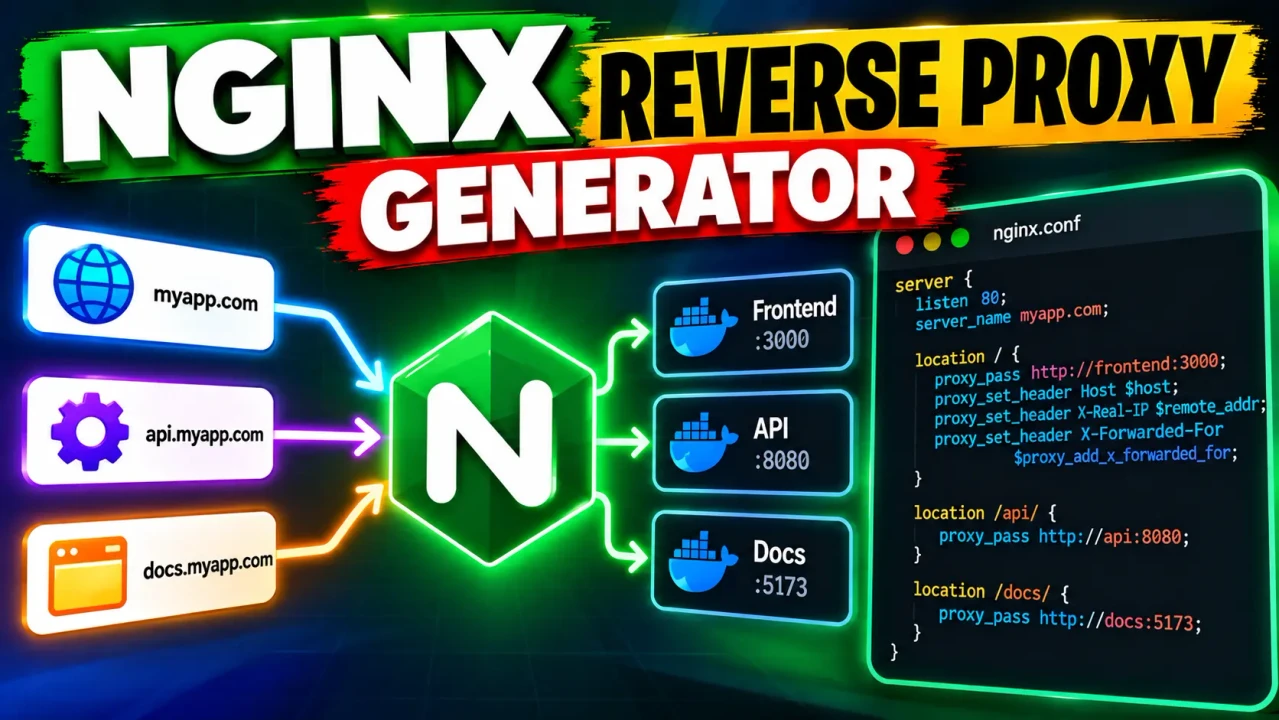
Nginx Reverse Proxy Generator
TL;DR Summary
The Nginx Reverse Proxy Generator is a developer utility intended to help create an Nginx reverse proxy configuration from the values supplied in the tool. The exact input fields, generation rules, and data-handling behavior are not provided in the available tool context, so treat generated configuration as a starting point and review it before using it on a production server.
The Nginx Reverse Proxy Generator is designed for a common web-server task: placing Nginx in front of another application or service and forwarding incoming requests to an upstream destination. A reverse proxy receives a client request and passes it to a backend service, then returns the backend response to the client. Nginx is widely used for this pattern because its configuration language can describe request routing and proxy behavior in a compact text format.
This ToolSpike page is intended for developers, system administrators, DevOps users, web developers, and people learning how Nginx reverse proxy configurations work. It can also be useful when you know the routing information you want but would rather generate a configuration template than write every directive from scratch.
What the Nginx Reverse Proxy Generator Does
The tool's stated purpose is to generate Nginx reverse proxy configuration. Because the supplied tool context does not expose the actual interface or implementation, the precise list of fields and directives generated by the live tool cannot be confirmed here. The generated result should therefore be treated as a configuration template rather than a guarantee that every deployment requirement has been handled.
In a typical Nginx reverse proxy setup, the configuration identifies a server that accepts client requests and an upstream application that should receive those requests. The proxy configuration then tells Nginx where to send matching requests. Depending on the actual fields available in the tool, users may be asked for information such as a hostname, backend address, backend port, or routing details. Do not assume that a particular field is supported unless it is shown by the tool itself.
What Is an Nginx Reverse Proxy?
A reverse proxy sits between users and a backend application. Instead of connecting directly to the application, a browser or other client connects to Nginx. Nginx then forwards the request to the configured backend service.
For example, a public site might use a hostname such as app.example.com while the application itself listens on a private address and port. Nginx can receive requests for the public hostname and proxy them to the application. The exact production configuration depends on the application, network layout, TLS setup, headers, WebSocket requirements, timeouts, and other deployment needs.
Inputs and Outputs
The supplied source does not document the live generator's exact input controls. This distinction matters because an SEO description should not promise fields or options that the actual interface does not provide.
| Item | What can be confirmed |
|---|---|
| Tool type | Nginx reverse proxy configuration generator |
| Primary input | Configuration values required by the live generator; the exact fields are not documented in the supplied source |
| Output | Generated Nginx reverse proxy configuration |
| Output format | Nginx configuration text |
| Units | None as a calculation; network ports and addresses may be represented as configuration values if supported by the live tool |
How to Use
- Step 1: Open the Nginx Reverse Proxy Generator and review the input fields shown by the live tool.
- Step 2: Enter the hostname, backend address, port, or other configuration values requested by the generator.
- Step 3: Check each value before generating the configuration, especially the public hostname and upstream destination.
- Step 4: Generate the Nginx configuration and review the resulting directives as plain text.
- Step 5: Adapt the generated configuration to your Nginx server, application, TLS setup, headers, and deployment requirements before applying it.
- Step 6: Validate the configuration with your Nginx installation and test the proxied application before relying on it in production.
Technical Explanation
This is a generator rather than a calculator, so there is no single mathematical formula. The underlying standard logic is configuration generation: user-provided routing values are represented as Nginx directives that define how requests should be handled and forwarded.
A simplified reverse proxy configuration commonly has a structure similar to this:
server {
    listen 80;
    server_name example.com;

    location / {
        proxy_pass http://backend;
    }
}
This example illustrates the general Nginx pattern only. It is not claimed to be the exact output of the ToolSpike generator. A real deployment may require additional directives for HTTP headers, HTTPS, WebSockets, redirects, buffering, timeouts, access controls, or other application-specific behavior.
In the simplified example, listen identifies the network port on which Nginx accepts connections, server_name identifies the hostname handled by the server block, location defines which request path is matched, and proxy_pass specifies the backend destination. The exact syntax and behavior can vary based on the requested routing design.
Example Configuration Pattern
Suppose a user needs Nginx to accept requests for a public hostname and forward them to an application running behind Nginx. The basic mapping can be understood as:
| Concept | Example | Purpose |
|---|---|---|
| Public hostname | app.example.com | Hostname clients use to reach the service |
| Request path | / | Path matched by the Nginx location block |
| Backend | http://127.0.0.1:3000 | Example destination for the application |
| Generated result | Nginx configuration text | Configuration that can be reviewed and adapted |
The addresses in this example are illustrative and do not describe a required ToolSpike input set. Your application may use a different hostname, address, protocol, port, or path.
Why Use This Nginx Reverse Proxy Generator & How Our Nginx Reverse Proxy Generator Beats the Competition
The practical value of a configuration generator is that it can turn supplied routing information into a reusable configuration template. The alternatives below have different trade-offs.
| Method | Ease of Use | Calculation Speed | Best For | Limitations |
|---|---|---|---|---|
| ToolSpike Nginx Reverse Proxy Generator | Uses a generator interface rather than requiring all configuration to be written manually | Generated from supplied values | Creating a starting Nginx reverse proxy configuration | Exact supported options depend on the live tool; generated configuration still needs review |
| Manual Configuration | Requires knowledge of Nginx syntax | Depends on the user | Custom configurations and experienced Nginx users | Easy to omit or mistype directives |
| Spreadsheet | Requires a custom template | Depends on the spreadsheet design | Structured configuration planning | Not a native Nginx configuration environment |
| Professional Infrastructure Software | Varies by product and workflow | Depends on the software and deployment process | Larger or more complex infrastructure workflows | May involve more configuration and operational requirements than a simple generator |
Assumptions and Limitations
The main limitation is that the supplied source identifies the tool by name but does not document its live interface, exact generated directives, supported options, validation rules, or data-processing behavior. This page therefore does not claim that the generator supports a particular TLS mode, authentication method, WebSocket configuration, load-balancing method, header policy, caching rule, timeout, or other Nginx feature unless the live interface explicitly provides it.
A generated Nginx configuration is also not automatically a complete production architecture. The correct configuration can depend on the backend application, DNS records, firewall rules, network topology, TLS certificates, operating system, Nginx version, request paths, and application requirements.
Users should review the generated text before deploying it. Check that the hostname points to the correct server, the upstream address and port are reachable, the selected paths are correct, and any security-sensitive directives match the intended deployment. Nginx configuration should also be tested with the appropriate Nginx configuration validation process before a service reload or production deployment.
Do not enter sensitive credentials, private keys, tokens, or other confidential information unless the live page clearly explains how that information is handled. The supplied tool context does not establish whether entered values are processed locally, sent to a server, or stored.
For simple development or testing setups, a generated configuration can provide a useful starting point. For production infrastructure, especially systems handling sensitive traffic or important services, the final configuration should be reviewed by someone familiar with Nginx and the application's networking requirements.
The Nginx Reverse Proxy Generator is therefore best understood as a configuration-generation aid. It does not replace understanding what each Nginx directive does or testing the resulting configuration in the environment where it will run.
