Compare JSON Online
TL;DR Summary
Compare JSON Online lets you place two JSON documents side by side, compare their contents, and spot differences such as changed values or fields. The supplied tool image indicates that comparison works in the browser and that data is not stored.
About Compare JSON Online
Compare JSON Online is a browser-based utility for checking the differences between two JSON documents. It is designed for situations where two JSON payloads look similar but you need to find exactly what changed. Instead of reviewing two blocks of JSON manually, you can place JSON A and JSON B into the comparison areas and review the highlighted differences.
JSON, or JavaScript Object Notation, is a common text format used to exchange structured data. Developers use it for API responses, request payloads, configuration files, application settings, test data, and other machine-readable information. Even a small change to one value or property can affect how an application behaves. A JSON comparison tool helps make those changes easier to see.
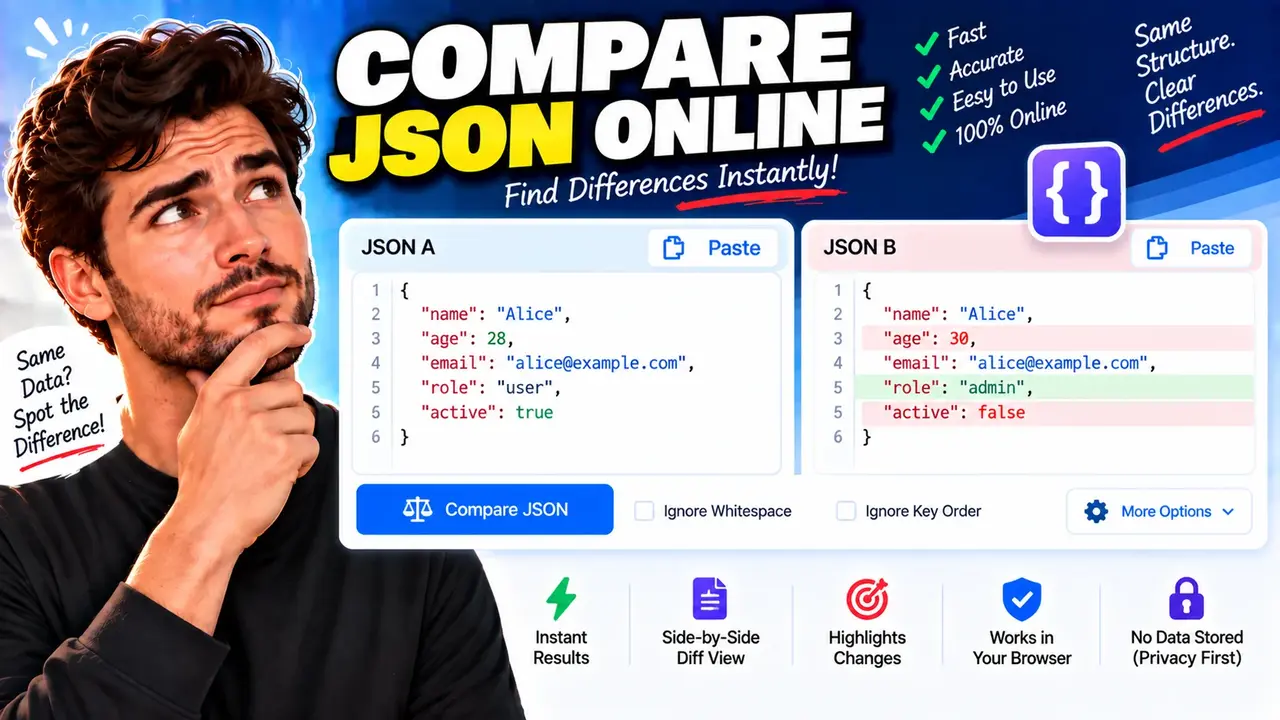
The supplied tool image shows two comparison panels labeled JSON A and JSON B. It also shows a Compare JSON button and options for ignoring whitespace and key order. The comparison result is presented as a side-by-side diff view that highlights changes. The image also indicates that the tool works in the browser and does not store the comparison data.
What Problem Does It Solve?
Manual JSON comparison can become difficult when documents contain many properties, nested objects, arrays, or repeated values. A quick visual inspection may miss a changed number, boolean, string, or property. Compare JSON Online provides a focused way to review two versions and identify differences.
For example, an API response may contain an age value of 28 in one version and 30 in another. A role might change from user to admin, or an active value might change from true to false. These are the types of changes that a JSON comparison workflow is intended to make easier to spot.
Who Can Use It?
Compare JSON Online is useful for developers, software testers, QA teams, API users, students learning JSON, technical writers, and anyone who needs to inspect two JSON documents. It can also help when checking configuration changes, reviewing test fixtures, comparing API examples, or investigating why two structured data responses are not behaving the same way.
What Inputs Are Required?
The main inputs are two JSON documents. JSON A represents one version and JSON B represents the other version. You can use an earlier and later API response, an original and edited configuration, or any other two JSON documents that you want to compare.
The supplied interface also shows comparison controls for whitespace and key order. These options can be useful when formatting differences should not distract from the data you actually want to review.
What Does the Tool Produce?
The main output is a visual JSON difference view. Differences are highlighted so you can review what changed between the two inputs. The supplied image presents the comparison as a side-by-side view, making it possible to examine JSON A and JSON B while identifying the highlighted changes.
The output should be treated as a comparison aid rather than a replacement for testing, validation, schema checking, or application-level review. A difference tells you that the compared documents are not the same under the selected comparison settings. It does not, by itself, explain whether the change is correct or appropriate for your application.
How to Use Compare JSON Online
- Step 1: Open Compare JSON Online and prepare the two JSON documents you want to check.
- Step 2: Place the first JSON document in the JSON A area.
- Step 3: Place the second JSON document in the JSON B area.
- Step 4: Review the available comparison options, including the controls for ignoring whitespace or key-order differences when those options are appropriate.
- Step 5: Select the Compare JSON button to run the comparison.
- Step 6: Review the side-by-side result and inspect the highlighted differences between the two documents.
Technical Explanation
Compare JSON Online is a comparison tool rather than a calculator, so it does not use a numerical formula. Its basic logic is to examine two JSON inputs and identify differences according to the comparison settings selected by the user.
A simple comparison can be represented as:
Difference = Compare(JSON A, JSON B, selected options)
JSON A: The first JSON document.
JSON B: The second JSON document.
Selected options: Comparison controls such as ignoring whitespace or ignoring key order, as shown in the supplied tool interface.
Result: A visual comparison that highlights detected differences.
Whitespace refers to characters such as spaces, tabs, and line breaks used to format JSON. Key order refers to the order in which object properties appear. These can sometimes change without changing the intended data structure. If the relevant option is enabled, the comparison can focus less on those presentation differences.
The exact internal comparison algorithm is not provided in the supplied materials, so the tool should not be described as using a specific diff algorithm or matching method. The practical purpose is clear: compare the two supplied JSON documents and highlight their differences.
Preset Example
The supplied tool image includes a useful example with a JSON A document and a JSON B document. In both versions, the name is Alice and the email is alice@example.com. The visible differences include an age change from 28 to 30, a role change from user to admin, and an active-status change from true to false.
| Field | JSON A | JSON B | Comparison |
|---|---|---|---|
| name | Alice | Alice | No visible value change |
| age | 28 | 30 | Changed |
| alice@example.com | alice@example.com | No visible value change | |
| role | user | admin | Changed |
| active | true | false | Changed |
Common Uses
- Compare two API responses before and after a software change.
- Review configuration changes between two environments.
- Check whether a JSON payload changed during testing.
- Find changed values in application settings.
- Review JSON examples supplied by different versions of an API.
- Inspect structured data without manually scanning every line.
Why Use This Compare JSON Online & How Our Compare JSON Online Beats the Competition
Different comparison methods serve different needs. Compare JSON Online provides a dedicated interface for comparing two JSON inputs, while manual review and spreadsheets require more user-managed work. Professional development software can provide broader workflows, but it may involve more setup than a focused online comparison task requires.
| Method | Ease of Use | Comparison Workflow | Best For | Limitations |
|---|---|---|---|---|
| Toolhox Compare JSON Online | Focused interface | Two JSON inputs with highlighted differences | Quick JSON comparison | Not a replacement for full testing or schema review |
| Manual Calculation / Review | Requires careful inspection | Read and compare both documents manually | Very small JSON examples | Easy to miss changes in larger documents |
| Spreadsheet | Requires setup | Data must be arranged for comparison | Structured tabular analysis | JSON structure may require additional preparation |
| Professional Development Software | Depends on the software | May support broader development workflows | Projects requiring integrated development tools | Can involve more configuration than a focused comparison task |
Assumptions and Limitations
The comparison result depends on the two JSON documents and the comparison options selected. Users should make sure they are comparing the intended versions and understand what the selected whitespace or key-order settings mean before interpreting the result.
A highlighted difference does not automatically mean that something is wrong. A changed value may be intentional. Likewise, two documents that appear similar may still require application testing or validation before they are considered interchangeable.
Compare JSON Online should not be used as the only review method for security-sensitive configuration, production changes, compliance decisions, or other high-impact work. The tool helps identify differences; users remain responsible for deciding whether those differences are expected and safe.
The supplied interface indicates that the comparison works in the browser and that data is not stored. Users should still avoid entering sensitive information if the current page displays different privacy terms or behavior than the supplied tool information.
When Should You Use a JSON Validator Instead?
Use a JSON validator when your main question is whether a document follows valid JSON syntax. Use Compare JSON Online when your main question is what differs between two JSON documents. In development workflows, validation and comparison can be complementary: first make sure the JSON is valid, then compare the relevant versions.
Summary
Compare JSON Online provides a focused way to inspect two JSON documents and identify differences. Its supplied interface includes JSON A and JSON B inputs, a Compare JSON action, options related to whitespace and key order, and a side-by-side difference view. This makes it useful for API payload checks, configuration reviews, testing, debugging, and other tasks where seeing changes clearly matters.
